Food menus and allergens
Build your menu with categories, items, modifiers and combos, and declare the 14 UK allergens for every dish.
In the console: Menu
If you run a restaurant, café or takeaway, your store is built around a menu rather than a product catalogue. You manage it from Menu in the console.
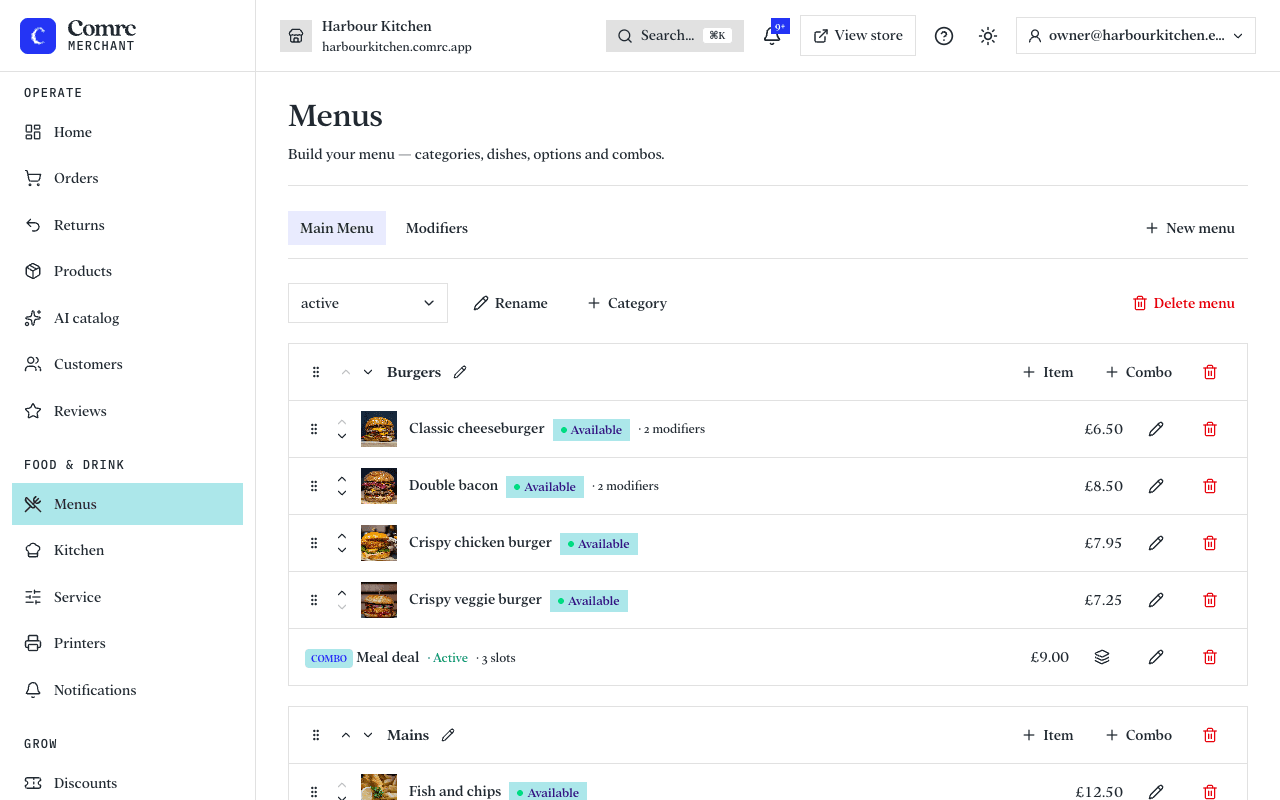
How a menu is organised
- Menus — you can have more than one.
- Categories — the sections of a menu, such as Starters, Mains and Drinks.
- Items — the dishes themselves, each with a price, description and photo.
- Modifiers — choices and extras on an item, such as a size, a choice of side, or extra cheese. A modifier can change the price.
- Combos — items sold together as a set, such as a meal deal.
Selling an item
- Mark sold out takes an item off your menu for customers while keeping it in the console. Mark available puts it back.
- Available hours limit an item to a window, such as breakfast, and hide it outside those hours. Leave them empty to serve it whenever you're open.
- An item's status can be Active, Hidden or Archived. Only active items are shown to customers.
- A menu can be Draft, Active or Archived. Customers see your active menus.
- Dietary badges — Vegan, Vegetarian, Gluten-free, Halal and Spicy — show on the menu. Only tick what's true of the dish as served; a dish that contains gluten can't be labelled gluten-free.
- Photo — save the item first, then upload one.
Modifiers and combos
A modifier group is a reusable set of options, such as sizes or sauces, that you build once in the Modifiers tab and attach to as many items as you like. Save the item first, then edit it to attach groups. Each option can add to the price (Extra) and can open another group of choices. A combo has a base price and slots, such as main, side and drink; a slot has the items a customer can choose from, and can charge an upcharge for some.
VAT on takeaway
Eat-in orders are always charged at the standard 20% rate. For collection and delivery you can set an item to Standard 20% (hot food, drinks, confectionery, crisps and ice cream) or Zero-rated (cold food such as sandwiches, salads and cakes sold cold). Check with your accountant if you're unsure.
Allergens
For every item, tick each of the 14 UK allergens it contains — or confirm that it contains none of them. Customers see this before they order.
Until you declare an item's allergens, customers are told to ask you about allergens before ordering it. Each modifier option can add allergens too, such as a sauce: the kitchen ticket and the customer see the dish's allergens plus those of the options chosen. An option you haven't declared flags the dish as not fully declared.
You can also add an allergy statement for your store — for example, that dishes are prepared in a kitchen that handles nuts — which customers see alongside your menu.
Note You're responsible for the allergen information you publish. Keep it up to date whenever a recipe or supplier changes.
Still stuck?
Email support@comrc.app and we'll help you out.